Why a drawing tool speaks Model Context Protocol
Every firm that drafts knows the shape of the job: a plan goes stale the moment someone types "revision 4" into the filename. Walls move, dimensions need realigning, the schedule of doors changes without the drawing noticing. An inference model can catch all of this – it is good at reading requirements, following rules and doing work that follows rules – but only if it can actually touch the drawing. That is what CADCraft does for us: a Model Context Protocol (MCP) server that exposes architectural drafting as tools – new sheet, frame, title, line, hatch, tag, dimension, schedule table – so a model near our data can draft the sheet itself.
What the integration actually does
The LocalAI inference stack runs the models on our own machines; CADCraft receives the instructions and drives the CAD engine. Concretely: a model plans the sheet (layout discipline, what to draw, in what order), CADCraft executes it as commands, and the engine renders real A3 sheets – frame and title strip, drawing frames, poché walls with hatch fills, glazing symbols, dimension chains with tick arrows, keynote leaders, revision tables and door/window schedules. We ran ten sheets through the pipeline to prove the pattern holds:
- Floor plan – workspace conversion. Room tags, fire compartment codes, clear-dimension chains and a 24-item door schedule.
- South elevations. Brick coursing at 1:100, window openings aligned with the plan grid, DPC and roof build-up keynotes.
- Wall section – build envelope. Layer-by-layer insulation hatch and material key, conditions line, damp courses.
- Setting-out plan. Grid bubbles, tolerance table, column key legend.
- Stair section. Rise-and-going strings, 150/240 rule check, guarded-opening notes.
- Reflected ceiling plan. Luminaire key and lighting notes, sprinkle layout at 1:50.
- Window junction detail. Frame make-up, sill drip and threshold build-up at 1:20.
- Steel moment connection. Weld symbols, bolt callouts, material schedule to member numbers.
- Location plan. Site boundary, setbacks, north arrow at 1:500.
- Sanitary layout. Fixture schedule and setting dimensions at 1:20.
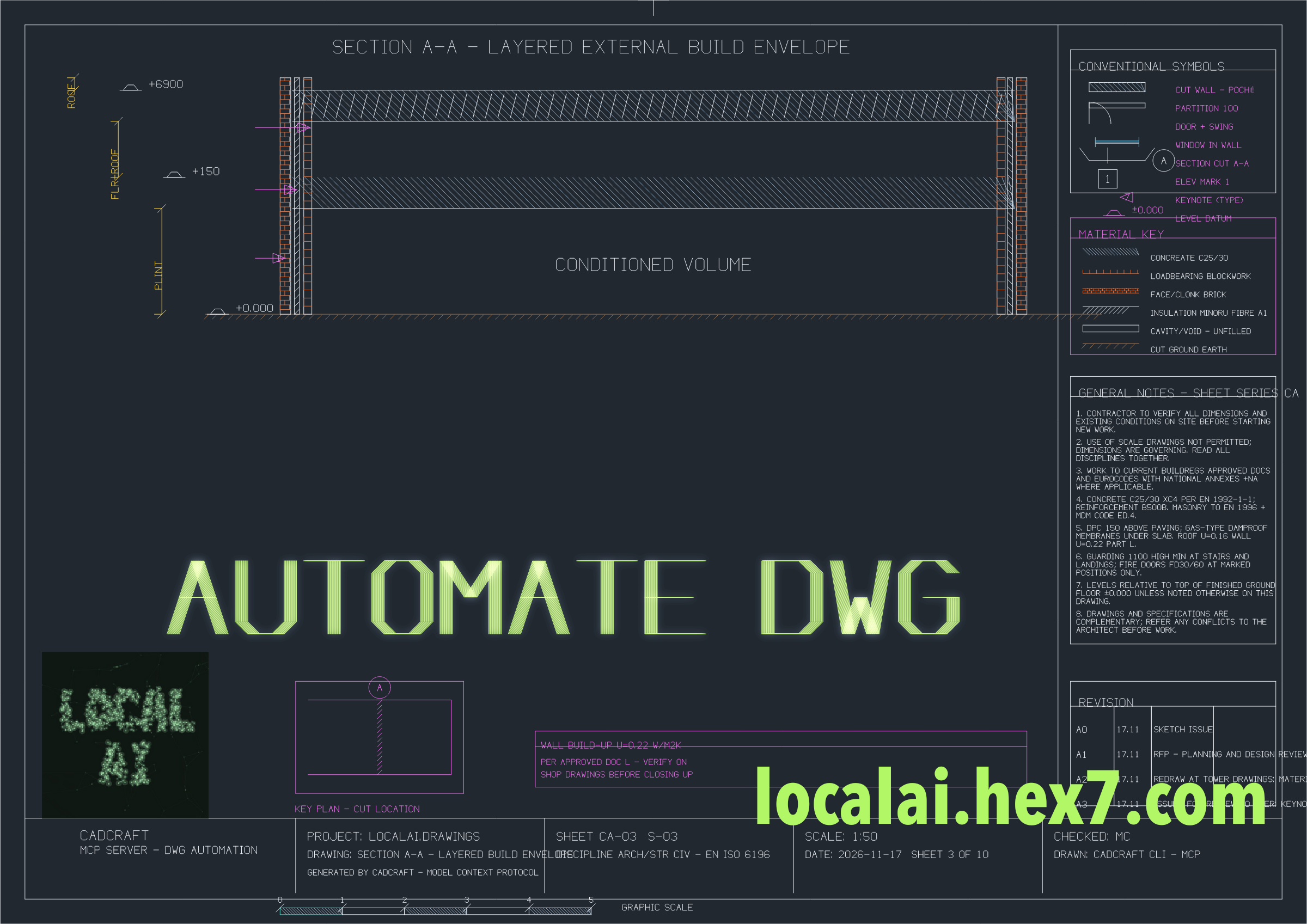
None of it is a screenshot of someone’s keystrokes: each sheet was generated from the model’s description of the task, drawn by the engine with drafting rules kept – minimum offsets, leader routing, hatch boundaries, title-strip discipline. Corrections come as instructions, not keystrokes.
How the MCP configuration lets a local model drive the integration
CADCraft is registered as an MCP server in the client configuration. The client – here a batch script of our own tower, but any capable client would do – sees a tool list before the conversation starts: new_drawing, frame, title, line, rectangle, polyline, text, dimension, leader, schedule table, render; about twenty drafting verbs, each with its parameter schema. That configuration is what turns a plain local model into a drafter. It knows what to ask for because the server tells it what exists.
The inference server exposes the model through an OpenAI-compatible endpoint; the MCP wiring joins them. Three things in the configuration do most of the work:
- Tool scoping. Which client may call which tools: the drafting client gets write tools, a reviewer is read-only (query, info), and batch jobs hold only new_drawing and render – so even a badly behaved model cannot delete anything.
- Prompts stay server-side. The voice rules and drawing discipline are injected by the MCP server, not improvised per chat. The model does not invent compliance; the configuration enforces it.
- Context stays small. Tool results return handles (sheet id, path, view), never geometry dumps. The engine holds the drafting rules – minimum offsets, leader routing, hatch bounds – and the model sends plans and corrections, so the conversation stays instruction-sized while the drawing grows sheet-sized. A model small enough to run on measured local hardware still drives a 400 mm wide A3 layout comfortably.
All of this runs on machines we quote by name: the inference server in the configuration is ours, and nothing between the model and the drawing crosses a network we do not own.
Why "local" matters for this work
A drawing pipeline is a compliance problem before it is a graphics problem. Plans and elevations are the client’s property; on the cloud they leave the building with every API call. Here the inference runs on hardware in our corridor – the same one we sell to clients – so the drawings never move. The same machine that answers a support inbox also drafts the elevation; nothing is shipped off-site, no CLOUD Act exposure, no SCCs.
What we do with it next
Ten sheets is a proof of concept. The real use is what follows: as-built checks, revision follow-through, schedule renumbering when a wall moves, first drafts at concept stage that let a drafter carry the project instead of typing it. The model plans; CADCraft draws; the engine keeps discipline – and the whole loop runs on local infrastructure.
If you want to see what your own drawings would do with an MCP drafting server behind them, we run on-site assessments before any purchase. Say hello at localai.hex7.com.
Leave a Reply